Guide contents
Quick answer: a visa requirement (requerimiento) is a request from Colombia's Ministry of Foreign Affairs (Cancillería) to complete or correct information or documents in your application. You answer it online, through the same visa form, in 6 steps: check your email, access your application, enter the application number and verify your data, upload the documents with the (+) icon, confirm the upload, and click Save in the Confirmation section.
Do not let it lapse: inactivity during the ten days after a requirement is treated as withdrawal of the application («se interpretará como desistimiento», Art. 97, paragraph 3, Resolution 5477 of 2022).
What a Colombian visa requirement is
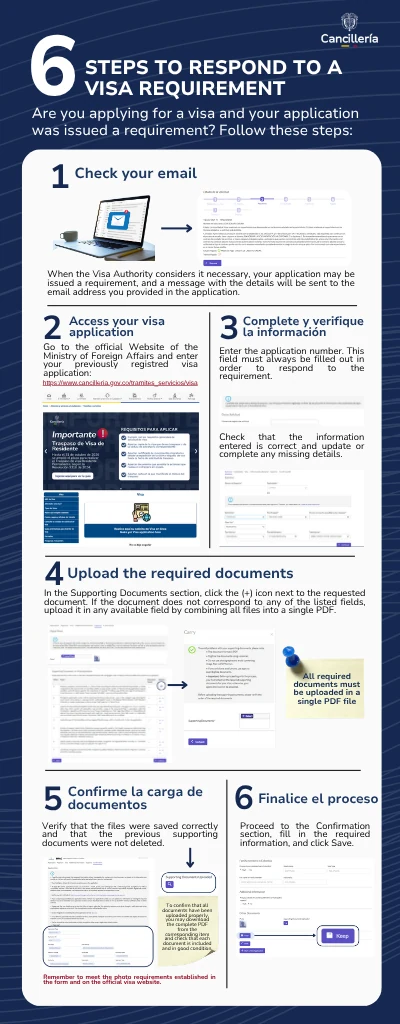
When the Visa Authority considers it necessary, your application may be issued a requirement: its status changes to “Requerimiento de información” (information request) and a message with the details is sent to the email address you provided. That is how the official Cancillería infographic and the SITAC user guide describe it.
A requirement is not a denial. It is the chance the authority gives you to complete your file before deciding. But the rules are strict: if you do not answer in time, or answer incorrectly, the procedure can end without a visa and without a refund of the study fee.
You can check at any moment whether your application is under a requirement with the official status check form; see our Spanish guide on checking your visa application status.
Deadlines and rules you must know
| Rule | What the regulation says |
|---|---|
| Time to act | Inactivity during the ten days after the requirement is treated as withdrawal, and the procedure ends without a decision (Art. 97, para. 3). |
| Number of requirements | The authority may request additional documents and interviews “hasta por tres veces” — up to three times (Art. 19). |
| Interview or physical documents | The authority may request physical documents and call you to an interview (Art. 24, para. 3). |
| Appeals | No administrative remedies are available against inadmission, requirements, denial, termination or cancellation of visas (Art. 100). A requirement is complied with, not disputed. |
| Visa category | When you modify the application you cannot change the visa type or category (SITAC guide). |
| Accuracy | Any inaccuracy in the data provided is grounds for denial or inadmission (Art. 8). |
The 6 official steps to respond to a visa requirement
Step 1. Check your email
The requirement arrives at the email address you entered in the application. Read it in full: it states the reason and the documents or data you must provide, and it includes the application number you will need in step 3. Check spam and promotions folders. If you mistyped your email when applying, you will only see the requirement through the status check.
Tip: list every item requested. Many responses fail because they only cover half of the requirement.
Step 2. Access your visa application
The infographic says to go to the official Ministry website (cancilleria.gov.co/tramites_servicios/visa) and enter your previously registered visa application. The direct form link is solicitarVisa.xhtml. Enter your details exactly as you originally registered them: passport, nationality, dates and names.
Step 3. Complete and verify the information
Enter the application number. The infographic stresses that “this field must always be filled out in order to respond to the requirement”. The SITAC guide adds that without this number the application cannot be updated, and that if you received several emails you should use the most recent number. Then check that the registered information is correct and update or complete any missing details in the sections indicated in the email.
Step 4. Upload the required documents
In the Supporting Documents (Soportes) section, click the (+) icon next to the requested document. The infographic gives a key instruction: if the document does not correspond to any of the listed fields, upload it in any available field by combining all files into a single PDF. Its highlighted note insists: “All required documents must be uploaded in a single PDF file.”
Step 5. Confirm the upload of documents
Verify that the files were saved correctly and that the previous supporting documents were not deleted. To confirm, the infographic suggests downloading the complete PDF from the corresponding item and checking that each document is included and in good condition. Also remember the photo requirements set in the form: 3 × 4 cm, color, white background, JPG up to 495 KB.
Step 6. Complete the process
Proceed to the Confirmation section, fill in the required information and click Save. Without this last step your answer is not registered. Afterwards, use the official status check to make sure the application left “Requerimiento” and returned to study.
How to prepare your response PDF
SITAC does not allow more than 35 pages across all documents, and the total size must not exceed 5 megabytes. This limit is hit very often. Our professional recommendations to avoid running out of space:
- Keep your application to 20–25 pages at most and leave room to answer possible requirements.
- Put some documents two pages per sheet to save space.
- Color PDFs scanned with a professional scanner. Avoid uploading poor-quality or illegible documents.
- Check the total file size before uploading. Over-compressing can make documents lose quality and become illegible.
- Once uploaded, documents cannot be deleted. If you waste space, you may have no room left to answer a requirement: the application can be inadmitted and you will have to start the whole process again.
- If you do not answer a requirement within 10 days, the application is deemed withdrawn and expires.
- One single PDF with all requested documents, in the order of the email. Optionally add a cover page listing each document and which point of the requirement it answers.
- Color and legible. Color PDFs scanned with a professional scanner; nothing illegible. Check the file size before uploading: over-compressing ruins quality.
- Recent documents. Supporting documents must not be older than three months (Art. 20).
- Apostille and translation. Foreign documents need an apostille or legalization and an official Spanish translation (Art. 21).
- Names identical to your passport on every document, including your health insurance policy.
Why Cancillería issues requirements
The resolution allows the authority to request additional documents when the information provided is not enough to decide (Art. 19). In practice, the most common reasons we see at CoVisas are:
- A health policy or medical plan that does not cover Colombian territory or the full stay, or does not meet the category's requirement. We can verify your policy for Cancillería.
- Documents without apostille, without official translation, or older than three months.
- Incomplete bank statements or proof of income that does not show the category's requirement.
- Name or data mismatches between the passport, the form and the documents.
- Illegible documents or files uploaded in the wrong field.
Mistakes that turn a requirement into an inadmission
- Letting the ten days pass: the application is deemed withdrawn and expires.
- Running out of space: if the original application already used almost all of the 35-page / 5 MB limit, there is no room for the answer, because uploaded documents cannot be deleted. Keep the initial application to 20–25 pages.
- Forgetting the application number or using an old one: the system will not open the application.
- Accidentally deleting earlier documents while uploading new ones (that is why step 5 exists).
- Not clicking Save in Confirmation.
- Answering only part of the requirement.
- Uploading a different document than the one requested, or one that does not solve the stated reason.
- Trying to change the visa category: not possible this way.
- Inaccurate data in the update: grounds for denial or inadmission (Art. 8).
Remember that no appeal is available against inadmission or denial (Art. 100). Your answer to the requirement is often the last chance to save the application.
Cover letter template for your response
It is not mandatory, but a first page inside the PDF helps the officer find each document and shows you answered everything. Write it in Spanish; you can adapt this model:
Señores
Autoridad de Visas e Inmigración
Ministerio de Relaciones Exteriores de Colombia
Asunto: Respuesta a requerimiento — Solicitud de visa n.º [application number]
Yo, [full name as in passport], pasaporte n.º [number], de nacionalidad [country], solicitante de visa [class and category], doy respuesta al requerimiento recibido el [date] y adjunto:
1. [Document] — responde al punto [x] del requerimiento.
2. [Document] — responde al punto [y].
Declaro que la información suministrada es exacta.
[Signature] · [Registered email] · [Date]
Translation: addressed to the Visa and Immigration Authority; subject “Response to requirement — Visa application no. […]”; it identifies you, lists each attached document and the point of the requirement it answers, and declares the information accurate.
If the deadline passed or the application was inadmitted
If you let the deadline pass, the application is deemed withdrawn and ends without a decision (Art. 97, para. 3). If it was inadmitted, the procedure also ends, but you may file a new application (Art. 98). In both cases no appeal is available (Art. 100) and the study fee is not refunded (Art. 11). The practical route is to prepare a new, complete application that fixes exactly what triggered the requirement, and pay the study fee again. If you are in Colombia, check your authorized stay so you do not become irregular while preparing it.
Official video of the visa form
Cancillería published a subtitled step-by-step video on filling out the online visa application form, useful to locate each section before answering. It is embedded in our Spanish guide on applying for the visa online.
Frequently Asked Questions
What is a visa requirement (requerimiento) in Colombia?
It is a request from the Visa Authority to complete or correct information or documents in your application. It arrives at your registered email and the application status changes to “Requerimiento de información”.
How long do I have to answer a Colombian visa requirement?
Inactivity during the ten days after the requirement is treated as withdrawal of the application (Art. 97, para. 3, Resolution 5477 of 2022). Answer as soon as possible.
Where do I answer the requirement?
In the same SITAC visa form (tramitesmre.cancilleria.gov.co/tramites/enlinea/solicitarVisa.xhtml), entering your data exactly as registered plus the application number from the email.
How do I upload a document that has no field?
According to the official Cancillería infographic, upload it in any available field, combining all requested files into a single PDF.
How many requirements can Cancillería issue?
The authority may request additional documents and interviews up to three times (Art. 19 of Resolution 5477 of 2022).
Can I change my visa category when answering?
No. Modifying the application lets you correct data and documents, but not the visa type or category.
What if I missed the requirement deadline?
The application is deemed withdrawn and the procedure ends; no appeal is available and the study fee is not refunded. File a new, complete application fixing what triggered the requirement.
How many pages can I upload in total?
The system does not allow more than 35 pages across all documents or more than 5 MB in total. Keep your application to 20–25 pages to leave room for requirements; uploaded files cannot be deleted.
Can I appeal a requirement?
No. No administrative remedies are available against requirements (Art. 100). It must be complied with within the deadline.
Does a requirement mean my visa will be denied?
No. It is the chance the authority gives you to complete your file before deciding. But if you do not answer on time or answer incompletely, the procedure can end without a visa.
What is the official link to answer a requirement?
Go to cancilleria.gov.co/tramites_servicios/visa and open the solicitarVisa.xhtml form, entering your details exactly as you originally registered them.
Which application number do I use if I received several emails?
The most recent one. Without that number the application cannot be updated.
Can I delete documents I already uploaded?
No. Uploaded documents cannot be deleted, which is why your initial application should use 20–25 pages at most and leave room for an answer.
How do I check that my documents uploaded correctly?
Download the complete PDF from the document icon and confirm that each file is included, readable, and that earlier supporting documents were not deleted.
What happens if I do not click Save at the end?
Your answer is not registered. Go to the Confirmation section, complete the requested information and click Save.
How do I know my answer was received?
Use the official status check and confirm the application left “Requerimiento de información” and returned to “Estudio” (study).
Can the requirement include an interview?
Yes. The authority may request physical documents and call you to an interview (Art. 24, para. 3).
How can I save pages in my response PDF?
Put some documents two pages per sheet, scan in color with a professional scanner, avoid blank pages and combine all requested documents into a single PDF.
What are the most common reasons for a requirement?
A health policy that does not cover Colombia or the full stay, documents without apostille or translation or older than three months, and incomplete bank statements or proof of income.
Should I include a cover letter in my response?
It is not mandatory, but a first page in Spanish listing each document helps the officer and shows you answered every point.
Is the study fee refunded if my application ends?
No. The study fee is non-refundable (Art. 11), even if the application is withdrawn or inadmitted.
Official sources: Infographic “Requerimiento solicitud de visa” (Ministry of Foreign Affairs, December 2025, PDF) · Cancillería – Visa · Official visa form (SITAC) · SITAC user guide (29/08/2024) · Resolution 5477 of 2022. Informational content, not legal advice.
🛡️ CoVisas plan: your visa medical requirement, complete
- All 7 mandatory coverages of Resolution 5477 in the contract
- Contracts up to 3 years · no age limit
- Consular letter included for Cancillería
- 20–30% more affordable · personal advisor 24/7